Strategic Flow

Zoho Analytics Q1 2026 — Audited.


Original article · zoho.com/blog/analytics · April 6, 2026

Original content
Zoho Analytics
Product Update · Q1 2026 · Platform Enhancements
Zoho Analytics Q1 2026

Zoho Analytics - Q1 2026 Product Update

We've started 2026 with a strong set of updates to Zoho Analytics, focused on one goal: helping you get more value from your data with greater efficiency.

From building custom visualizations and taking instant action with drill actions, to optimizing performance with archive data and strengthening white-label security, Q1 2026 brought in a well-rounded set of enhancements designed to improve both flexibility and control across your analytics workflow.

New Business Applications

Zoho Analytics expands its data connectivity with the addition of 9 new connectors, making it easier to analyze data from a wider range of business applications.

These include Zoho ERP, PayPal, Zoho Spend, Odoo Online, Zoho FSM, Adobe Commerce, Tally Prime, Insightly, and Constant Contact, helping you unify your data and gain deeper insights across your business ecosystem.

Use Single Zoho Databridge Instance for Importing Data

Setting up multiple Databridge instances for every user to import data from the same source is no longer necessary. A single Zoho Databridge instance can now be shared across your organization and workspaces, securely enabling multiple users to import data from the same database server, without the need for additional installations.

Build Custom Visualizations

No more limitations on chart availability. You can now build charts tailored to your exact data and business needs using JavaScript libraries. Whether you're creating advanced visualizations, integrating custom interactions, or matching specific design requirements, you have complete control over how your data is presented.
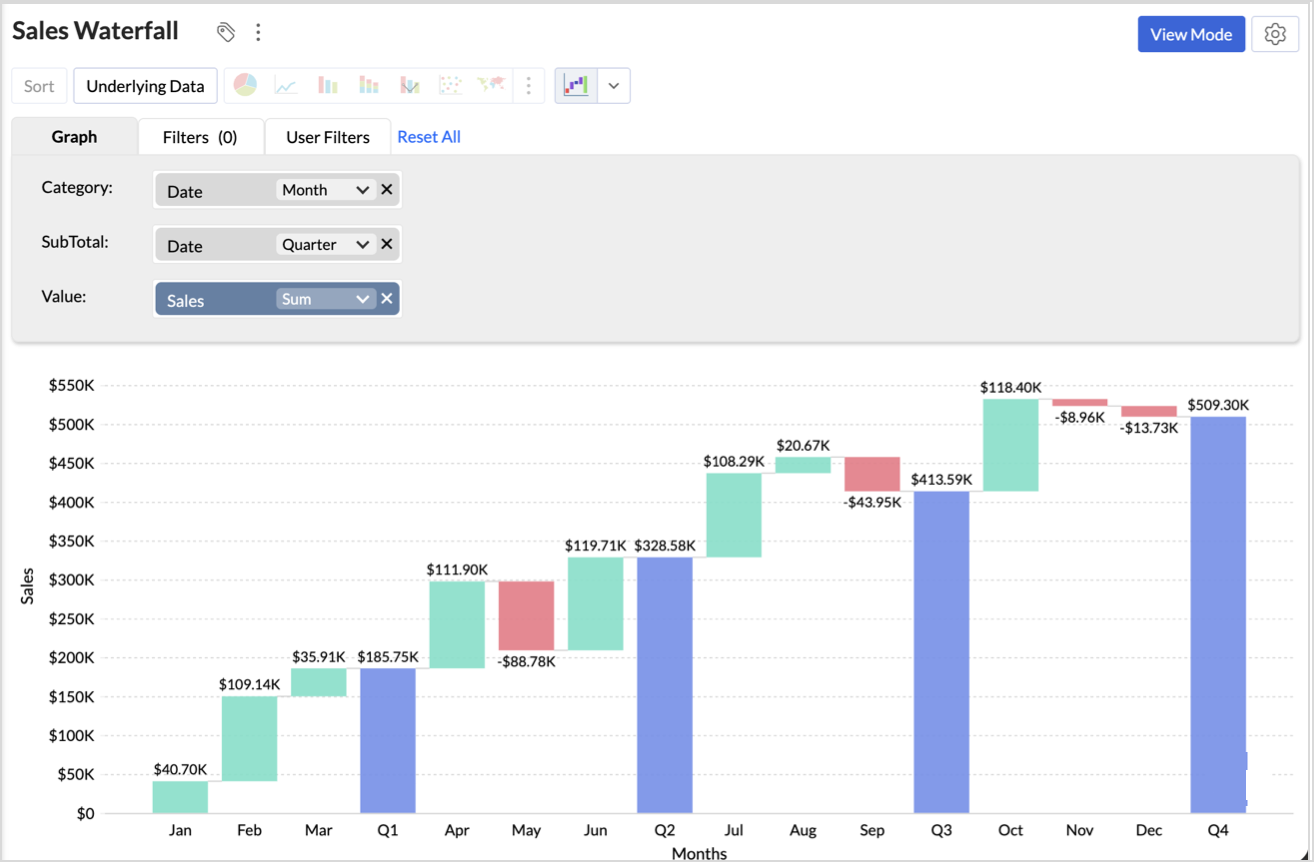
Custom Visualizations

Act on Your Data with Drill Actions

Insights are only valuable when you act on them. With Drill Actions, you can go beyond analyzing data and take immediate action right from within your reports. Whether it's updating records, triggering workflows, or navigating to external systems, Drill Actions let you interact with data at a granular level and respond instantly, without switching applications.
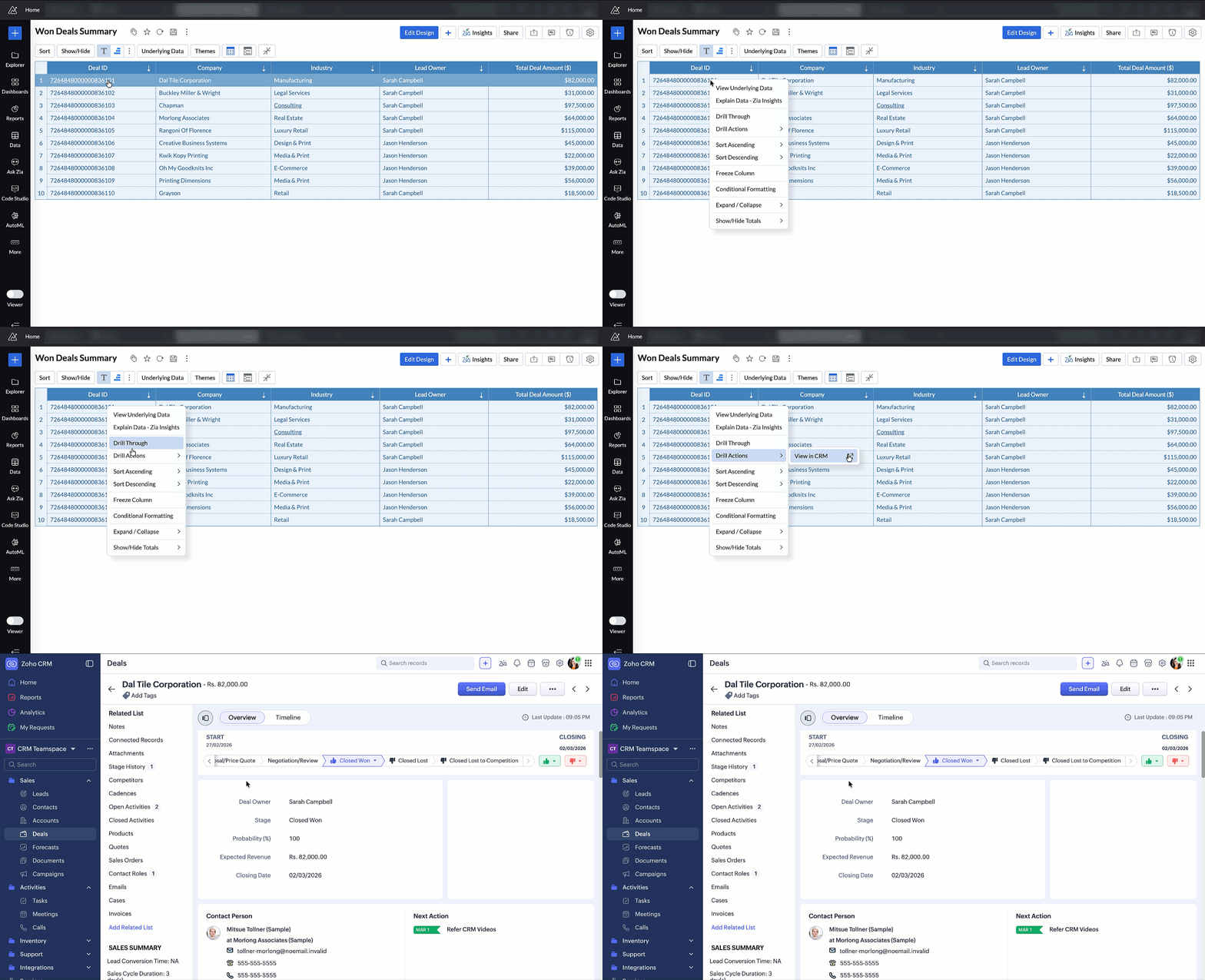
Drill Actions

Geo Map Viz Enhancements

  • Synchronized Map Zoom In Dashboards: With Map Zoom Sync, panning or zooming one map automatically updates all maps on the dashboard. Stay focused on the same region across views, making comparisons faster and analysis more seamless.
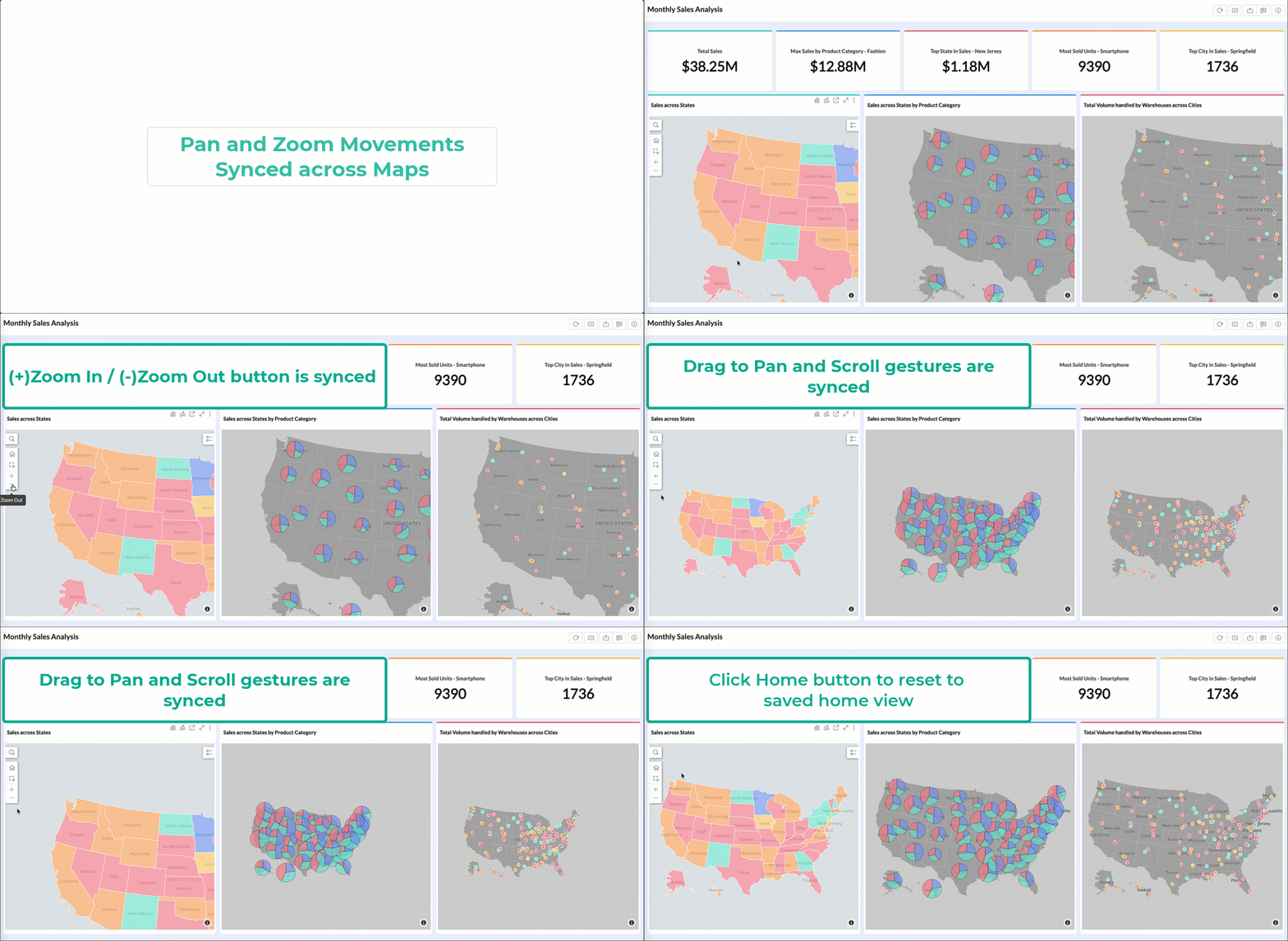
    Map Zoom Sync
  • US Hex Bin Projection: Geo map visualizations now support US Hex Bin projection, offering a cleaner and more balanced way to represent state-level data. Each state is displayed as an equal-sized hexagon, making comparisons more consistent and easier to interpret.
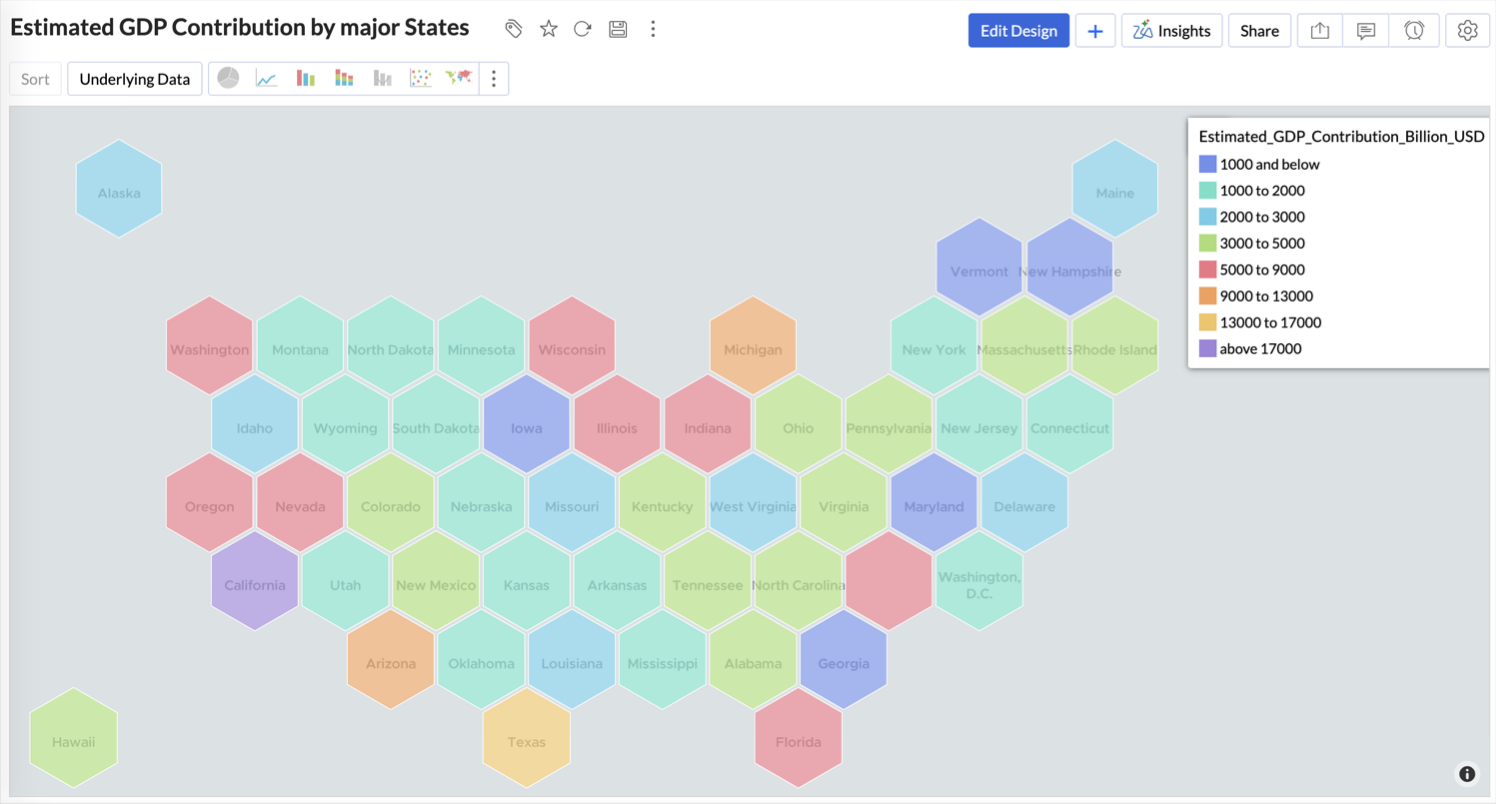
    US Hex Bin

Dashboard Enhancements

  • Drill-through is now supported for widgets. Previously limited to reports, it can now be configured directly from widgets to view related data and gain deeper insights with ease.
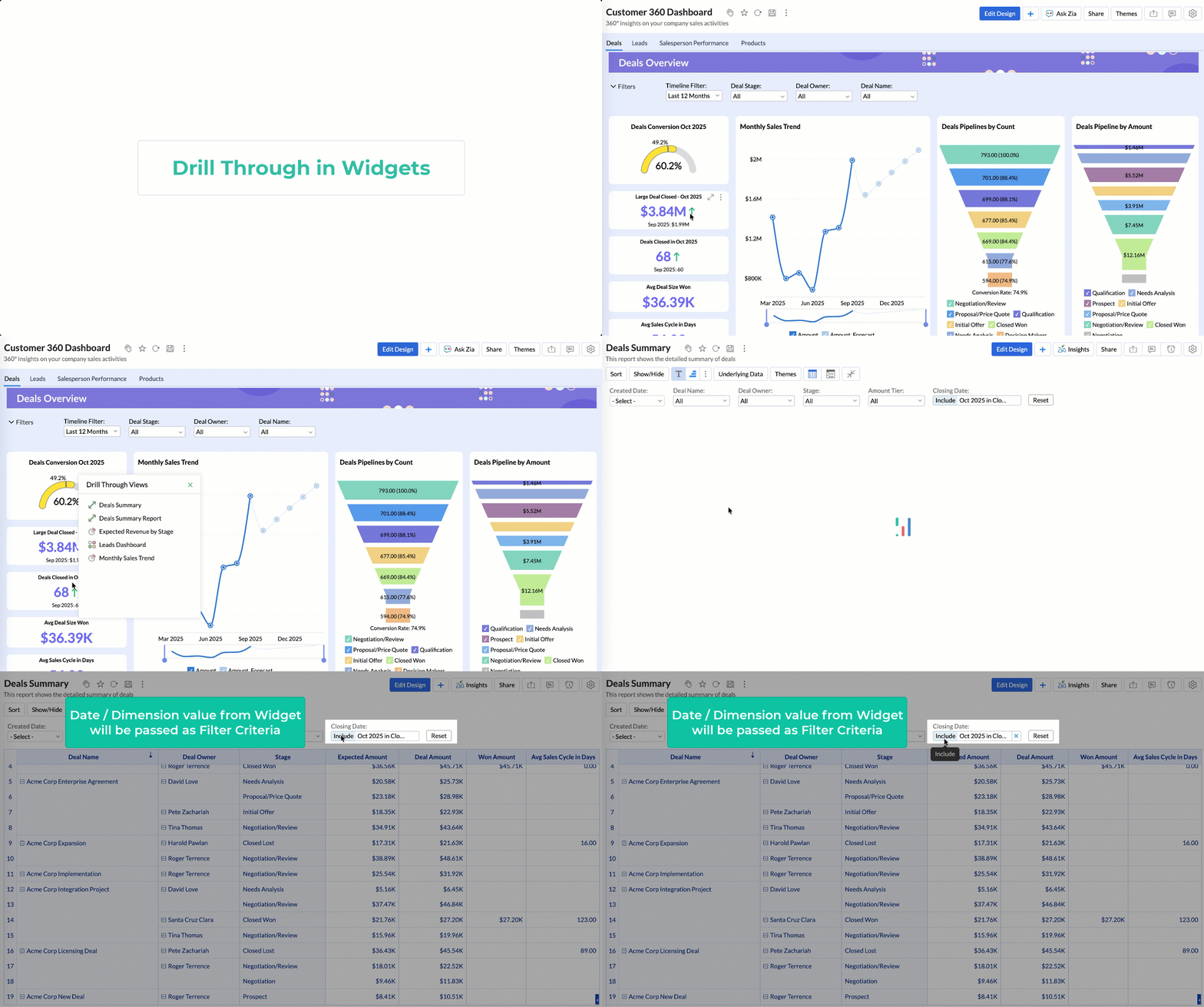
    Drill Through
  • Customize Zia Insights position to place insights exactly where they add the most value, whether alongside visualizations for quick context or in prominent sections to highlight important findings.
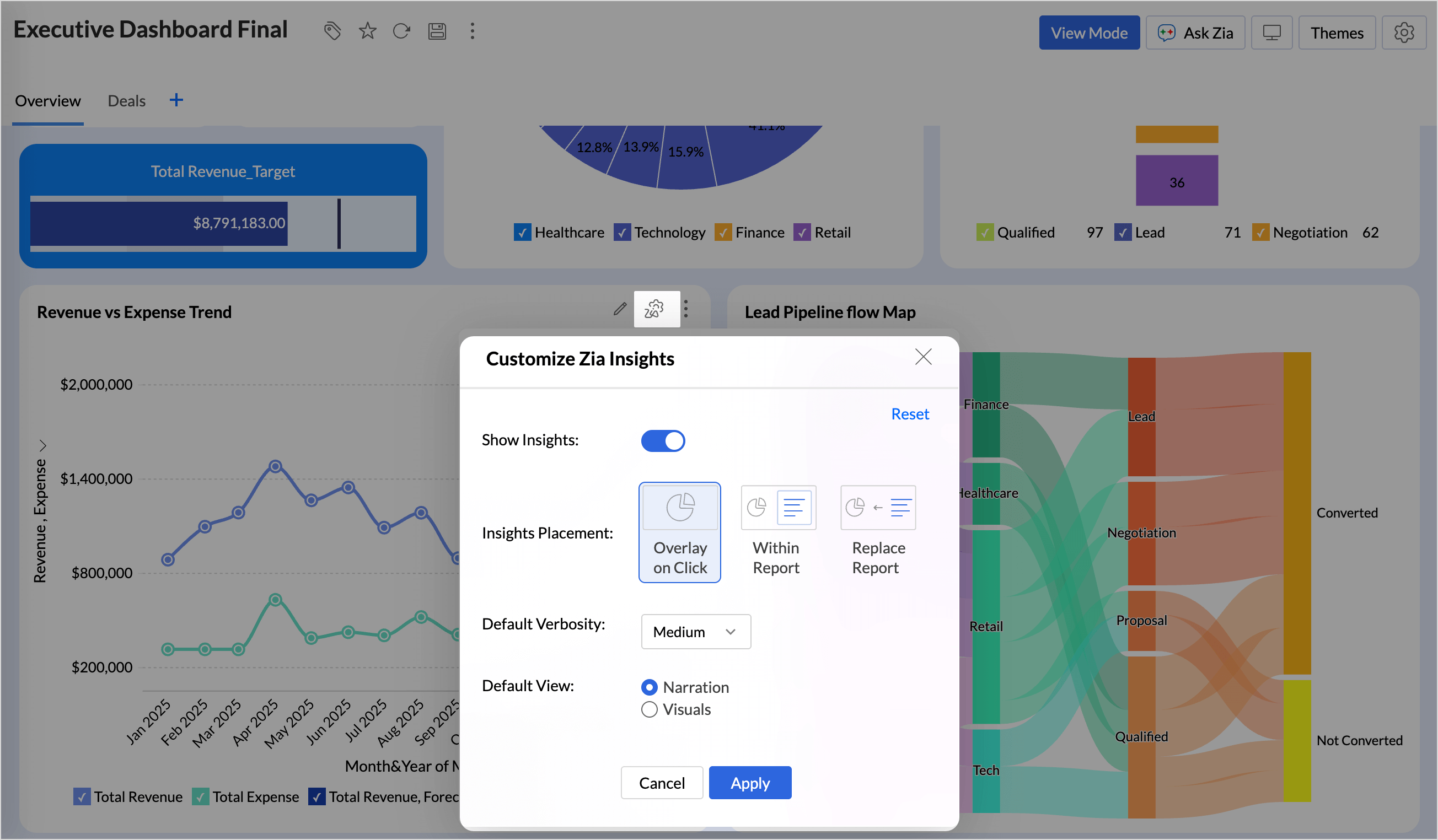
    Zia Insights

Manage Data Efficiently with Archive Data

As your data grows, so does the cost of querying it. Running reports on large volumes of historical data can slow down performance and impact overall efficiency, even when that data isn't actively needed.
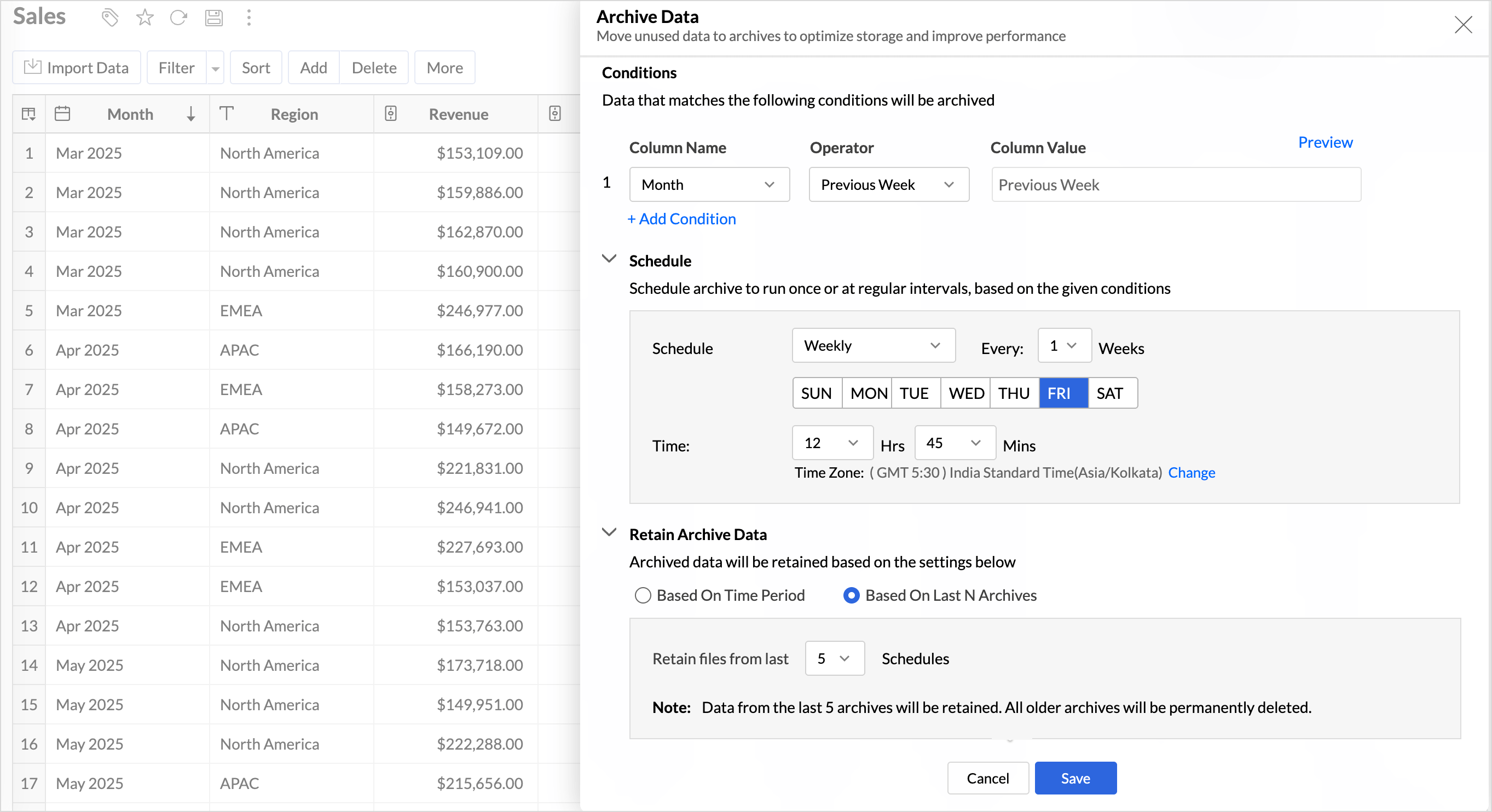
Archive Data

With Archive Data, you can keep your analytics environment lean and focused. Easily move older or less frequently used records out of active tables, while still retaining them securely for future reference. This ensures that your reports and dashboards operate only on relevant, high-value data.

Track GenAI Activity Logs

Keep tabs on how GenAI functionalities are used across your organization with dedicated logs that provide clear visibility and improved governance.
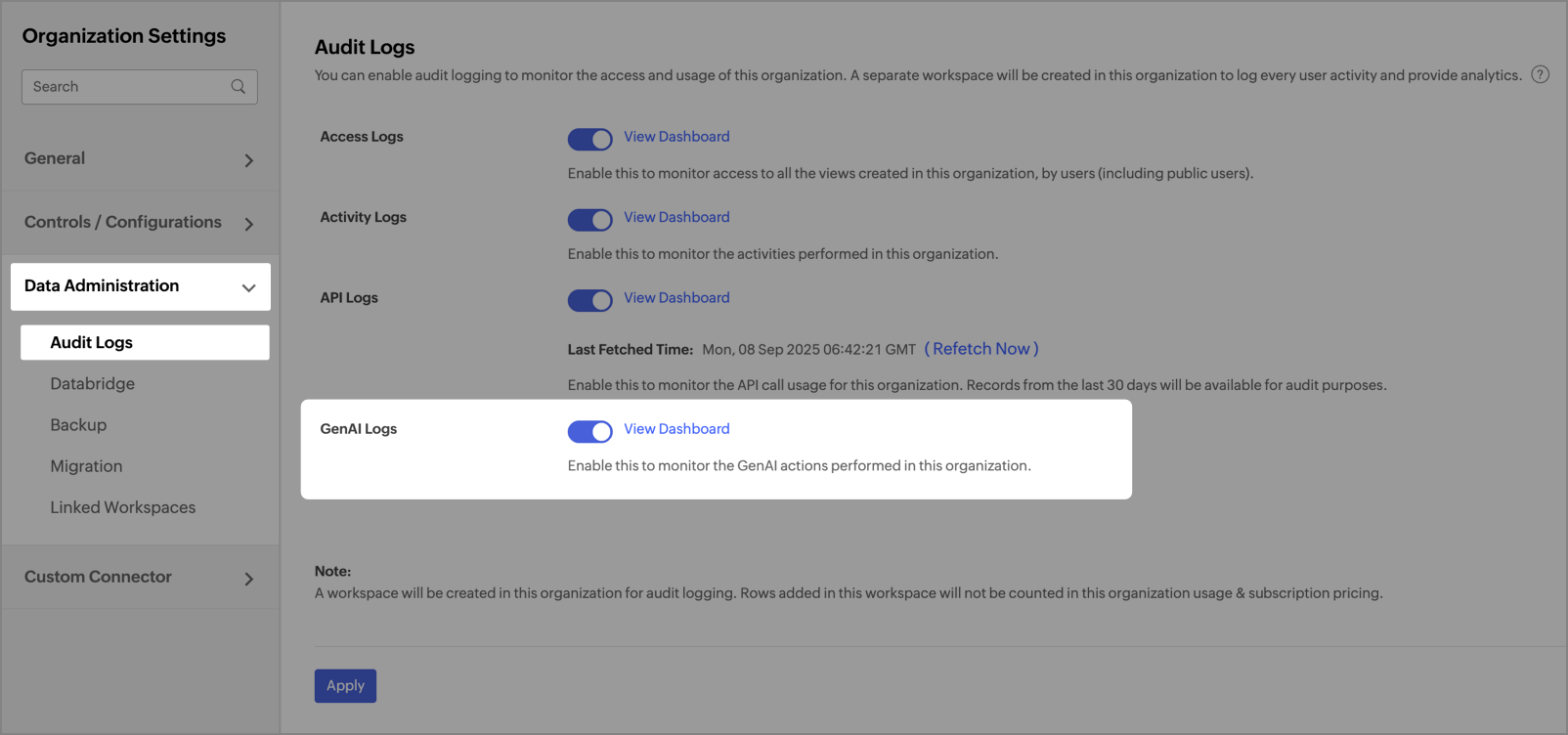
GenAI Logs

Secure Access with Code Studio Domain Allowlist

Ensure secure and controlled interactions from Code Studio by defining a list of trusted domains. Only the domains added to this allowlist will be permitted for API calls, preventing unauthorized external access.

Improved Access Control for White Label Portals

Enhance security for white label portals with stronger access control, enforce Multi-Factor Authentication (MFA) for non-SSO users and define session policies like concurrent session limits, idle timeouts, and session validity to better manage user access.

API Enhancements

We've enhanced our API capabilities across data management and AutoML, making it easier to access metadata, build models, and manage deployments end to end.

That brings us to the end of our Q1 updates, focused on making your analytics faster, more actionable, and easier to scale. Explore the full details on our What's New page.

⚠️
Title is product-first, not problem-first — "Q1 2026 Product Update" is a filing label, not a hook. A reader already using Zoho Analytics has no reason to open this email over anything else in their inbox.
⚠️
12 features listed with equal visual weight — Archive Data, Drill Actions, Custom Visualizations, Map Zoom, US Hex Bin, Drill-through widgets, Zia Insights, GenAI Logs, Databridge, Code Studio, White Label MFA, API Enhancements — all presented as a flat list. No hierarchy, no narrative, no reason to care about any specific one.
⚠️
"We've started 2026 with a strong set of updates" — announcement language. Every SaaS product update email opens this way. It signals to the reader: this is a changelog, not a reason to act.
⚠️
No pain points — only feature descriptions — "Build charts tailored to your exact data" is a feature. "Your BI team is rebuilding the same chart in four different tools because Zoho's default types don't support your exec's request" is the pain that makes the feature matter.
⚠️
9 new connectors buried in paragraph 2 — Zoho ERP, PayPal, Adobe Commerce, Constant Contact — these are named integrations that specific users have been waiting for. They get two sentences and no visual treatment.
⚠️
No stat cards, no numbers — "faster," "more actionable," "easier to scale" are claims without evidence. The 3X speed improvement from Archive Data, the 9 named connectors, the single Databridge instance — all quantifiable, none quantified.
⚠️
CTA is a suggestion, not an action — "Explore the full details on our What's New page" is an invitation to more reading. The reader who just read 600 words of feature descriptions is not motivated to read more. The CTA should resolve the tension created by the hook.
Strategic Flow — Rebuilt

Zoho Analytics Q1 2026 — Rebuilt.

Newsletter rebuild · High-Impact tier · strategic-flow-pro.replit.app

Rebuilt newsletter
Conversion score
Original
4/10
Flat feature list. No pain points. Announcement language. 12 updates with no hierarchy. CTA invites more reading.
Rebuilt
9/10
3 pain points in hook. 4 feature cards with images. Connector table with 9 named integrations. Stat cards. Specific CTA.
3 A/B subject line variants
Outcome — 3 pain points
Cut dashboard load times, act on insights instantly
Names two specific outcomes (speed + action) from the three pain points. Reader immediately knows what's in it for them.
Predicted open rate: 34–40%
Question — consequence
Is old data killing your dashboard performance?
Question format creates cognitive gap — reader must open to confirm or deny. Archive Data is the answer they'll find.
Predicted open rate: 29–35%
Specificity — connectors
Q1 2026: 9 connectors + workflow triggers + map sync
Specificity signals truth. Users waiting for PayPal or Adobe Commerce see the exact feature they've requested.
Predicted open rate: 26–32%
Strategic Flow

The 7 Strategic Upgrades

What changed, and why each change converts better

Subject line transformation
❌ Original
Zoho Analytics - Q1 2026 Product Update
A filing label. Describes the contents, not the reader's problem. Could be skipped by every active Zoho user who assumes they'll check the changelog later.
✓ Rebuilt
Cut dashboard load times, act on insights instantly
Names two specific outcomes from real user pain. Reader knows why this matters before opening. Creates urgency through consequence, not announcement.
Upgrade 01
Consequence before product — always
"Q1 2026 Product Update" is what Zoho did. "Your dashboards are slow. Your maps reset manually. Your insights sit idle." is what the reader is losing. The original opens with Zoho's perspective. The rebuild opens with the reader's daily friction. Recognition beats announcement as a hook — every time.
Upgrade 02
12 features → 4 cards with hierarchy
The original lists 12 updates with equal visual weight — Databridge and Drill Actions get the same treatment as MFA for white-label portals. The rebuild surfaces the 4 highest-impact features as visual cards with screenshots. Hierarchy creates scanning — flat lists create skipping. The remaining features (GenAI logs, Code Studio, API) are consolidated in the CTA destination.
Upgrade 03
Connectors get a table, not a sentence
9 named connectors — Zoho ERP, PayPal, Adobe Commerce, Constant Contact — are buried in a single paragraph. Each connector has a user waiting for it. The rebuild gives them a scannable table with direct links to documentation. A user waiting for PayPal integration needs to see "PayPal" at a glance, not read through a sentence to find it.
Upgrade 04
Stat cards replace abstract claims
"Faster, more actionable, easier to scale" are assertions the reader has seen a thousand times. "9 new connectors / 0 app switches / 1 Databridge instance" are claims that can be verified, visualised, and remembered. Numbers beat adjectives — not because they're more impressive, but because they're specific, and specificity signals truth.
Upgrade 05
Pain point setup for every feature card
The original describes what each feature does. The rebuild opens each card with what the reader is experiencing without it. Archive Data: "your queries are bloated." Map Zoom: "you're adjusting every widget by hand." Drill Actions: "acting on insights means switching apps." Features don't sell — the cost of not having them does.
Upgrade 06
Two CTAs, two conversion moments
The original has one CTA at the very end — after 600 words of feature descriptions. The rebuild places CTA 1 above the feature cards (when the reader is curious and has just seen 3 stat cards) and CTA 2 after the cards (when the reader has seen the full proof). Different psychological moments require different calls to action. The first reduces friction ("explore in my workspace"). The second closes with social proof ("all updates live now").
Upgrade 07
Connector pain point woven into hook
The connector card includes a fourth pain point in the hook: "Your data lives in PayPal, Adobe Commerce, Tally Prime — analyzing across disconnected systems requires manual exports every time." This maintains narrative symmetry — 4 pain points in the hook body, 4 feature cards in the body, 4 references in the CTA. Every promise made in the subject must be delivered in the body. Every feature card must be set up by a pain point. The hook and the body must speak the same language.

This is the Strategic Flow Method

Lead with the reader's problem. Surface the strongest proof first. Let numbers replace adjectives. Give connectors a table. Two CTAs for two psychological moments. Every feature card set up by a pain point. Hook and body in perfect symmetry.

strategicflow.carrd.co →

← Back to all teardowns